
SEO title: Poetry Python: Tutorial, Poems, Code Examples & Writing Techniques
Meta description: Learn what Python Poetry is, how to install and use it, and how it compares with pip and uv. Also find 15+ original Python poems and creative writing ideas.
URL slug: /poetry-python
The phrase “poetry python” means two very different things. For developers, Poetry is a tool that manages Python dependencies and packaging. For writers, it means poems about Python, the language or the snake, and poems written in Python code.
This guide covers both. First you get a practical walkthrough of the Poetry tool, with commands, tables and fixes for common problems. Then you get 15+ original poems, 12 poetry types, and techniques for writing your own code poetry.
What Is Python Poetry?
Python Poetry is an open source tool that handles dependency management, virtual environments, and packaging for Python projects. It keeps your project’s libraries organized in one configuration file and locks exact versions so every machine installs the same thing.
Sébastien Eustace started the project, and it is now maintained by a wider community. Developers use it to build apps, libraries, APIs and data science projects.
The word also has a second meaning. Poetry Python can describe creative writing inspired by the Python language, such as haiku about bugs or limericks about indentation. Both meanings appear later in this article.
Read Also This Blog: Poetry Site
What Does Python Poetry Do?
Poetry solves a problem that many beginners meet sooner or later. Your project works on your laptop but fails on a teammate’s computer because a library version is different.
Poetry fixes that by doing five jobs:
- Dependency resolution: it finds library versions that work together.
- Lock file creation: it writes exact versions to
poetry.lock. - Virtual environment management: it creates an isolated environment for each project.
- Building packages: it creates wheel and source distributions.
- Publishing: it uploads your package to PyPI or a private repository.
Before tools like this, many developers juggled requirements.txt, setup.py, virtualenv and twine by hand. Poetry brings those jobs under one command line.
Characteristics of Python Poetry
These are the traits that set Poetry apart:
- One config file. Project details and dependencies live in
pyproject.toml. - Deterministic installs. The lock file means the same versions install every time.
- Dependency groups. You can separate main, dev, test and docs packages.
- Built in virtual environments. No separate setup is needed.
- Plugin support. You can extend it, for example to restore the old
poetry shellcommand. - Semantic version constraints. Operators like caret (
^) and tilde (~) control upgrades. - Clean command line. Commands are short and predictable.
Effects of Python Poetry on Your Workflow
Using Poetry changes how a team works in a few clear ways.
Positive effects:
- Fewer “works on my machine” bugs
- Faster onboarding for new developers
- Cleaner pull requests, because the lock file records every dependency change
- Simpler release process for libraries
Trade-offs to know about:
- Resolving dependencies can feel slow on large projects
- There is a learning curve around
pyproject.toml - Some older tutorials show commands that no longer work in Poetry 2
Purpose of Python Poetry
The purpose is simple: to make Python projects reproducible and easy to share. It aims to give Python the kind of dependency experience that Node’s npm or Rust’s Cargo already offer.
It also pushes projects toward standard metadata. Poetry 2 supports the [project] table defined by PEP 621, so your configuration works with other tools too.
How to Use Python Poetry?
Here is the shortest path from nothing to a working project.
Step 1: Install Poetry
The official installer is the recommended route.
bash
curl -sSL https://install.python-poetry.org | python3 -You can also use pipx:
bash
pipx install poetryCheck that it works:
bash
poetry --versionStep 2: Create a New Project
bash
poetry new my-app
cd my-app
For an existing folder, run poetry init instead. It asks a few questions and builds your pyproject.toml.
Step 3: Add Dependencies
bash
poetry add requests
poetry add pytest --group dev
The first command adds a main dependency. The second adds a development only package.
Step 4: Install Everything
bash
poetry installThis creates the virtual environment, installs packages, and writes poetry.lock if it does not exist yet.
Step 5: Run Your Code
bash
poetry run python main.pyThat brings us to a common search.
Poetry Run Python: What It Means?
Poetry run python launches the Python interpreter inside your project’s virtual environment. You do not need to activate anything first.
Useful variations:
| Command | What it does |
|---|---|
poetry run python script.py | Runs a script in the project environment |
poetry run python -m pytest | Runs tests as a module |
poetry run pytest | Runs an installed tool directly |
poetry run python | Opens an interactive shell |
One note for newer users. In Poetry 2, the old poetry shell command is no longer built in. You can install the shell plugin, or use poetry run and the environment’s own activation script.
A Modern pyproject.toml Example
Poetry 2.x supports the standard [project] table:
toml
[project]
name = "my-app"
version = "0.1.0"
description = "A small demo project"
requires-python = ">=3.10"
dependencies = [ "requests (>=2.32,<3.0)"]
[build-system]
requires = ["poetry-core>=2.0.0,<3.0.0"]
build-backend = "poetry.core.masonry.api"
Keep this file in version control. Commit poetry.lock too if you build an application.
Python Poetry Version: Check, Update, and Compatibility
To see which version you have, run:
bash
poetry --versionTo update Poetry itself:
bash
poetry self updateAs of mid 2026, the Poetry 2.4 line was current, but releases come often, so check PyPI for the newest number. Some points worth remembering:
- Poetry 2.0 added PEP 621 support and moved
poetry shellinto a plugin. - Poetry 2.3 dropped support for Python 3.9, so it needs Python 3.10 or newer.
- If your Docker image uses an older Python, pin Poetry to a compatible release instead of installing the latest.
Pinning is good practice in CI too. It stops a surprise upgrade from breaking your build.
Poetry Set Python Version
There are two separate things here, and mixing them up causes most confusion.
- The version your project supports. This is set in
pyproject.toml. - The interpreter Poetry uses for the virtual environment. This is set with a command.
To pick the interpreter:
bash
poetry env use 3.12You can also pass a full path:
bash
poetry env use /usr/bin/python3.12To set the supported range, edit the file:
toml
requires-python = ">=3.10,<4.0"Poetry uses interpreters already installed on your machine. It does not download Python for you. Many people pair it with pyenv for that.
Poetry Update Python Version and Poetry Change Python Version
Changing the Python version in a project takes five short steps:
- Install the new Python version on your system.
- Edit the version constraint in
pyproject.toml. - Run
poetry env use 3.13(or your target version). - Run
poetry lockto refresh the lock file. - Run
poetry installto rebuild the environment.
Then run your tests. Some packages need newer releases to support a new Python version, and Poetry will tell you when it cannot find a match.
Python Poetry Remove Virtualenv
Sometimes an environment gets corrupted or points at an old interpreter. Delete it and start fresh.
List your environments:
bash
poetry env listRemove one:
bash
poetry env remove python3.12Remove all of them for the project:
bash
poetry env remove --allThen run poetry install to build a clean one. If you prefer to see the environment inside your project folder, run poetry config virtualenvs.in-project true before installing. It creates a .venv folder that editors detect easily.
Python Poetry Publish
Poetry can send your package to PyPI in three commands.
bash
poetry config pypi-token.pypi YOUR_TOKEN
poetry build
poetry publish
You can also run poetry publish --build to do both steps at once.
Before the real upload, test on TestPyPI. Add it as a repository, publish there, and install your package in a clean environment. Always use an API token, never your account password.
Python Poetry License
Poetry is released under the MIT license. That means you can use it in personal, commercial and closed source projects. Keep the license notice if you redistribute the code.
Your own package needs a license too. Set it in your project metadata so users know how they can use your work.
Python Poetry GitHub
The source code lives in the python-poetry/poetry repository on GitHub. It is the right place to:
- Read the changelog before upgrading
- Report bugs
- Search closed issues for error messages
- Follow plugin and roadmap discussions
When a command misbehaves, searching the issue tracker often gives you the answer in minutes.
Python Poetry Logo
The official logo and branding assets are available through the project’s website and GitHub repository. If you want to put it on a blog post, slide or README badge, check the repository first for current files and usage guidance rather than copying an image from a random site.
Python Poetry vs pip
pip installs packages. Poetry manages the whole project. The two work at different levels, so the comparison is about workflow rather than a winner.
| Feature | Poetry | pip |
|---|---|---|
| Installs packages | Yes | Yes |
| Creates virtual environments | Yes, automatically | No, needs venv |
| Lock file | Built in (poetry.lock) | Not by default |
| Dependency resolver | Yes, project wide | Yes, per install |
| Build and publish | Yes | Needs extra tools |
| Learning curve | Moderate | Very low |
| Best for | Apps and libraries | Quick installs and scripts |
Choose pip for tiny scripts. Choose Poetry when more than one person touches the project, or when you plan to publish.
Python Poetry vs uv
uv is a newer tool from Astral, written in Rust, and it has gained fans quickly because of its speed. It handles packages, virtual environments, lock files and even Python installs. Some teams have moved from Poetry to uv, and migration guides now appear in many project docs.
| Feature | Poetry | uv |
|---|---|---|
| Speed | Good | Much faster |
| Lock file | poetry.lock | uv.lock |
| Installs Python itself | No | Yes |
| Plugin system | Mature | Limited |
| Build and publish | Yes | Yes |
| Maturity | Established since 2018 | Newer, fast growing |
| Command style | poetry add, poetry run | uv add, uv run |
If speed and managing Python versions matter most, try uv. If you already use Poetry and your workflow is stable, there is no emergency to switch. Test on a small project first.
Python Poetry Alternatives
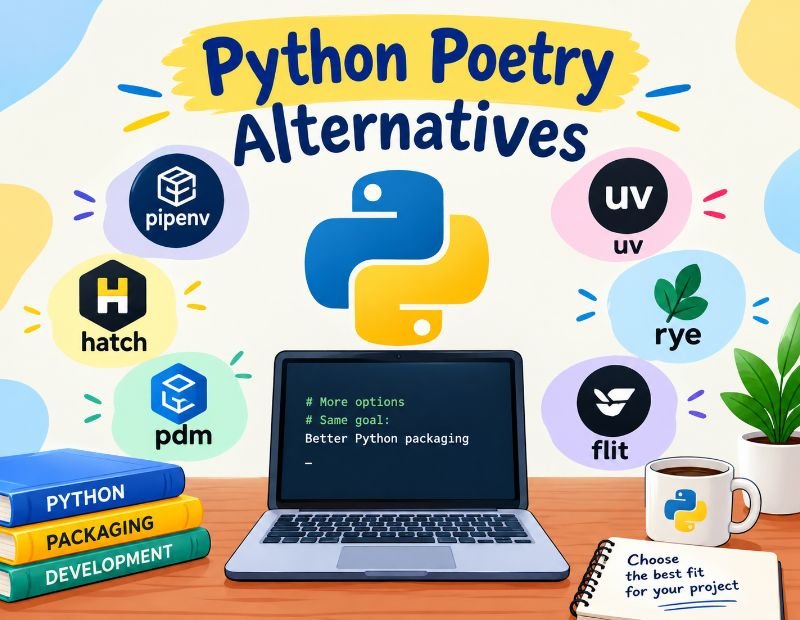
Several other tools cover similar ground:
- uv: very fast all in one tool
- pip with venv: simple and built in
- Pipenv: combines pip and virtual environments
- PDM: standards focused, with PEP 582 roots
- Hatch: project manager with strong build features
- Conda: good for data science and non Python dependencies
Pick based on your team, not on trends. The best tool is the one everyone on the project will actually use.
Python Poetry Tutorial: Quick Cheat Sheet
| Task | Command |
|---|---|
| Create a project | poetry new name |
| Start in existing folder | poetry init |
| Add a package | poetry add package |
| Add a dev package | poetry add pkg --group dev |
| Remove a package | poetry remove package |
| Install all | poetry install |
| Update packages | poetry update |
| Refresh lock file | poetry lock |
| Show environment info | poetry env info |
| Build the package | poetry build |
| Publish | poetry publish |
Now the Creative Side: What Is Poetry About Python?
Python has a surprisingly literary culture. The language is named after the British comedy group Monty Python, not the snake. Its design philosophy even ships as a short text of guiding lines, which you can read by typing import this in any interpreter.
Writers find Python poetic for a few reasons. Its syntax reads almost like English. Indentation gives code a visual shape, like stanzas. And the snake itself carries rich symbolism, from wisdom and rebirth to danger.
Characteristics of Python Poetry
Good Python Poetry themed poems tend to share these traits:
- Short lines with clear images
- Playful use of tech vocabulary such as loops, bugs and imports
- Humor mixed with real feeling
- Structure that mirrors code, like repetition and nesting
- Metaphors that connect logic and emotion
Effects and Purpose of Python Poetry
These poems make technical ideas easier to remember. They can lower the stress of learning to code, since a joke about a missing colon helps beginners laugh at their errors.
They also build community. Developers share code poems at meetups, in blogs and on social media. The purpose is part education, part self expression, and part fun.
12 Types of Python Poetry (With Original Examples)
Here are twelve forms you can try, each with an original poem.
1. Haiku
Three lines with five, seven and five syllables.
Silent indent grows,
a tiny space holds the world,
the loop wakes at dawn.
2. Limerick
Five lines with an AABBA rhyme and a bouncy beat.
A coder named Dee loved to run
Her scripts just to see them be done.
But a tab and a space
Left a bug in its place,
And her weekend was gone, not much fun.
3. Couplet
Two rhyming lines, great for short and short poetry.
I fixed one bug before the night was through,
and found a hundred more that all were new.
4. Quatrain
Four lines, often rhymed ABAB or AABB.
The snake of logic coils through the screen,
each function wraps the next in quiet grace.
Where errors hide, the patient eye is keen,
and clean code finds its calm and steady pace.
5. Acrostic
Each line starts with a letter of a word. Here, PYTHON:
Patience is the first thing that I learn,
Yielding to each error that I meet.
Tests will pass in time, and I will earn
Hours back from fixes, small and neat.
One more line, and then one more again,
Now the program hums, and I am free.
6. Cinquain
Five lines with 2, 4, 6, 8 and 2 syllables.
Import,
a door swings wide,
new tools drift in like light,
and every empty file begins
to speak.
7. Tanka
Like haiku, but with 5, 7, 5, 7, 7 syllables.
Rain on the window,
the terminal glows softly,
one last test to run.
Green text slides across the dark,
and my tired heart finally rests.
8. Free Verse
No fixed rhyme or meter. It follows the speaker’s voice.
I used to fear the blinking cursor.
Now it feels like a pulse,
a small patient animal
waiting for me to say something true.
9. Sonnet (Opening Quatrains)
A fourteen line form. Here are the first eight lines to show the style.
I wrote a script to tell me what to do,
It listed every task I would forget.
It sorted out the old from what was new,
And paid in time each small unpaid debt.
But when it asked me how I felt that day,
No function in my code could understand.
Some things resist the neatly written way,
And need a heart, a voice, and open hand.
10. Ode
A praise poem addressed to a person or thing.
Oh list comprehension, small and bright,
you shrink my loops to lines of light.
What once took five, you do in one,
and leave my mornings bathed in sun.
11. Ballad
A storytelling poem in short stanzas.
There was a snake of whitespace made
that slept inside a file,
and when a tired coder stray,
it tripped him with a smile.
12. Elegy
A reflective poem about loss. Developers often write them for retired tools.
Farewell to the old and trusted way,
the scripts that served us night and day.
We let you go with thanks and cheer,
for what you taught us, we hold dear.
Bonus: Code Poems That Actually Run
A code poem is valid Python that also reads like verse. Try these.
Poem 1: The Loop
python
dreams = ["coffee", "bugs", "morning light"]

for dream in dreams:
    print(f"I debug my {dream}, and the night grows bright")
Poem 2: Fading Words
python
love = "code"

while love:
    print(love)
    love = love[:-1]

print("silence")
Poem 3: A Tiny Haiku Generator
python
import random

first = ["Silent loop", "Green tests pass", "Late night fix"]
second = ["a function breathes slowly", "the cursor waits for me", "bugs fall like soft rain"]
third = ["morning comes", "all is calm", "I press save"]

print(random.choice(first))
print(random.choice(second))
print(random.choice(third))
The generator ignores syllable counts, so treat it as a toy. You could extend it with word lists that follow the 5, 7, 5 pattern.
Short Python Poetry
Short poems travel well. They fit in a tweet, a code comment or a README.
Semicolon gone,
the whole program stops to cry.
One small mark, great weight.
Print, and then the world,
hello answers back to me.
Keep them under four lines, with one clear image.
Famous Python Poetry
There is no single canon, but a few pieces are well known in the community:
- The Zen of Python by Tim Peters, a short list of guiding principles shown by
import this. Many readers treat it as a poem about code. - Monty Python’s verbal comedy, which gave the language its name and its playful tone.
- Ovid’s tale of Apollo and the serpent Python in the Metamorphoses, the ancient story behind the snake’s name.
Classical Python Poetry
Classical poetry used the Python serpent as a symbol. In Greek myth, a great serpent guarded Delphi until Apollo defeated it. Writers used the tale to explore order beating chaos and new power replacing old.
Classical style relies on formal meter, elevated language and mythic images. A modern writer can borrow that tone to give a poem about code real weight.
Traditional Python Poetry
Traditional forms such as the sonnet, ballad, ode and limerick still suit Python themes. They bring rhyme and rhythm to a topic that is often seen as dry. The contrast between old forms and new technology is part of the charm.
Modern Python Poetry
Modern Python poetry is looser. It appears as free verse, social media posts, code comments and generative art. Many writers now use real code as part of the poem, so the program and the text work together.
Writing Techniques for Better Python Poetry
Use these simple methods to improve your writing:
- Start with a concrete image. A blinking cursor beats the word “technology.”
- Borrow code vocabulary. Words like loop, import, return and exception have emotional echoes.
- Use structure as meaning. Repeat a line like a loop, or indent a line like nested code.
- Keep it short. Cut every word that does not earn its place.
- Read it aloud. Rhythm problems are easy to hear.
- Make the code run. If you publish a code poem, test it first.
Creative Ideas to Try
- Write a haiku for every Python data type
- Turn a bug you fixed into a limerick
- Make an acrostic from your favorite library name
- Write a poem that prints a different last line each time
- Host a code poetry night with your team
Conclusion
Poetry Python is a rich topic because it covers both craft and code. The tool gives you reliable dependency management, clean virtual environments and a simple path to publishing. The creative side gives you a playful way to learn, teach and share what you love about the language.
If you are new to the tool, start small. Install Poetry, create a test project, and run poetry run python. Then try one poem from this guide and change a few words. Both skills reward steady practice.
Frequently Asked Questions
What is Python Poetry?
It is a tool that manages dependencies, virtual environments and packaging for Python projects through one pyproject.toml file.
How do I use Python Poetry?
Install it, run poetry new or poetry init, add packages with poetry add, then run code with poetry run python.
What does Python Poetry do?
Python poetry resolves compatible library versions, locks them, creates virtual environments, builds packages and publishes them to PyPI.
What does poetry run python do?
It runs the Python interpreter inside your project’s virtual environment without manual activation.
How do I set the Python version in Poetry?
Use poetry env use 3.12 for the interpreter and set the supported range in pyproject.toml.
How do I update or change the Python version in Poetry?
Install the new Python, edit the constraint, run poetry env use, then poetry lock and poetry install.
How do I check my Poetry version?
Run poetry --version. Update it with poetry self update.
How do I remove a Poetry virtualenv?
Run poetry env list, then poetry env remove python3.12, or use --all to delete every environment.
How do I publish a package with Poetry?
Run poetry build and then poetry publish, after setting a PyPI API token.
What license does Poetry use?
Poetry uses the MIT license, which allows free personal and commercial use.
Is Poetry better than pip?
Poetry offers more for full projects, such as lock files and publishing, while pip is simpler for quick installs.
Is uv better than Poetry?
uv is faster and can install Python versions, while Poetry has a longer track record and a plugin system.
What are some Python Poetry alternatives?
Popular options are uv, pip with venv, Pipenv, PDM, Hatch and Conda.
What are the main types of Python poetry (creative)?
Haiku, limerick, couplet, quatrain, acrostic, cinquain, tanka, free verse, sonnet, ode, ballad and elegy all work well.
Where can I find the Poetry GitHub repository?
It is at python-poetry/poetry on GitHub, where you can read changelogs and report issues.